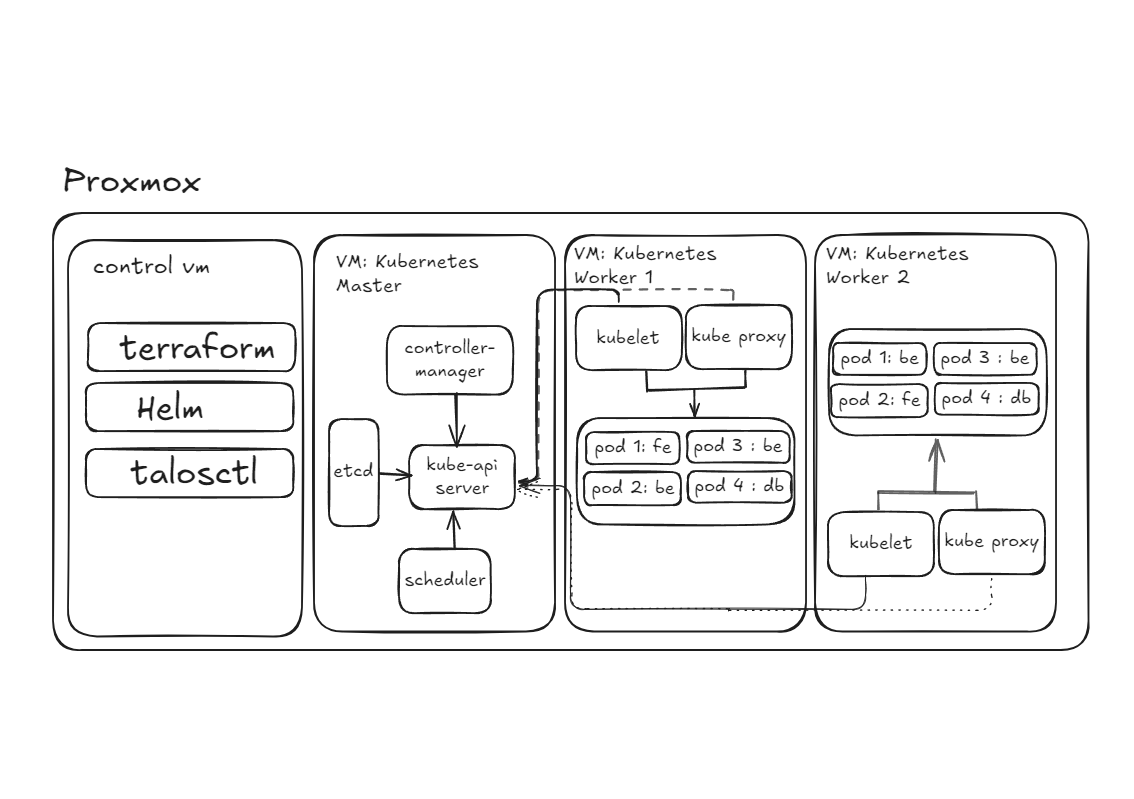
I started learning Kubernetes by building a small cluster on an on-premise Proxmox environment. Instead of trying to memorize every Kubernetes object first, I wanted to understand the path from infrastructure to a running workload.
This note documents that learning setup. It is related to citadel, but the goal here is narrower: explain the mental model I use to understand the pieces and where each management tool belongs.
The setup I wanted
I wanted the physical environment to behave more like infrastructure I could reproduce from code. Proxmox provides the virtualization layer, while Terraform creates and configures the virtual machines used by the cluster.
Before creating Kubernetes nodes, I made one separate control VM for the tools I use to manage the environment. This machine is not part of the Kubernetes control plane and does not run application workloads.
It contains:
- Terraform to provision virtual machines in Proxmox;
- kubectl to communicate with the Kubernetes API;
- Helm to install and manage packaged Kubernetes applications;
- talosctl to configure and inspect Talos Linux nodes.
Talos is intentionally managed through its API rather than a normal SSH-based administration workflow. Keeping the management tools on one control VM gave me one predictable place from which to operate the lab.
The Kubernetes mental model
At a high level, I think about the cluster as two responsibilities: the control plane maintains the desired cluster state, while worker nodes run the workloads.
What the control plane does
The control plane contains the components that coordinate the cluster rather than the application containers themselves.
The components I needed to understand first were:
- kube-apiserver — the main API surface used by clients and other Kubernetes components;
- etcd — the distributed key-value store that holds Kubernetes cluster state;
- kube-scheduler — selects an appropriate node for newly created Pods that do not yet have one;
- kube-controller-manager — runs controllers that continuously reconcile actual state toward desired state.
The word reconcile was the most useful concept for me. Kubernetes is not simply a sequence of commands sent from one machine to another. Controllers keep observing state and taking actions when reality differs from what has been declared.
What a worker node does
Worker nodes provide the compute where Pods actually run.
A worker typically includes:
- kubelet — the node agent that watches the desired Pod state assigned to its node and works with the container runtime to keep those Pods running;
- kube-proxy — one implementation of Kubernetes Service networking on a node;
- a container runtime — runs the containers that make up Pods.
This helped me separate two ideas that initially looked similar: the control plane decides and records desired cluster state, while node-level components make the assigned workload real on each worker.
Pods and namespaces
A Pod is the smallest deployable unit Kubernetes schedules. A Pod can contain more than one container, but those containers share a lifecycle and network context, so I do not treat a Pod as a generic place to bundle unrelated services together.
A common multi-container case is an application container plus a tightly coupled helper or sidecar. A database with its own persistence and lifecycle is usually better treated as a separate workload rather than placed in the same Pod as the application only for convenience.
A namespace provides a logical scope for grouping and naming Kubernetes resources. In my lab, it is useful for separating projects or environments without pretending that a namespace is a complete security boundary by itself.
For example:
college-projects [namespace]
├── backend-pod  → worker 1
├── frontend-pod → worker 2
└── database-pod → worker 2
Resources in the same namespace can still run on different worker nodes. The namespace groups Kubernetes objects; it does not pin them to one machine.
How my lab fits together
My current Proxmox setup is intentionally small:
- Control VM — Terraform, Helm, kubectl, and talosctl;
- Control-plane VM — Kubernetes control-plane components;
- Worker VM 1 — node services and application workloads;
- Worker VM 2 — node services and application workloads.
Terraform manages the virtual-machine layer. Talos provides the node operating system and API-driven machine management. Kubernetes then manages cluster resources and workload scheduling above those machines.
kubectl and other clients communicate with the Kubernetes API server. The control-plane components update cluster state, and kubelets on worker nodes continuously observe the Pods assigned to their nodes and reconcile the local runtime toward that desired state.
That model is more accurate than thinking of the API server as directly pushing every instruction to every worker.
What I learned from building it
The useful lesson was not that every personal project needs Kubernetes. For a small application, this environment is intentionally more complex than necessary.
The value was seeing several infrastructure boundaries in one system: provisioning virtual machines, configuring immutable nodes, declaring cluster state, scheduling workloads, and operating everything through APIs instead of manual server setup.
I am still learning this stack, so I treat this page as a working engineering note rather than an authoritative Kubernetes reference. As my understanding changes, I would rather correct the model than preserve an explanation just because it was written first.
Saya mulai mempelajari Kubernetes dengan membangun cluster kecil di lingkungan on-premise Proxmox. Alih-alih menghafal semua objek Kubernetes, saya ingin memahami hubungan dari infrastruktur sampai sebuah workload berjalan.
Catatan ini mendokumentasikan setup tersebut. Proyeknya berkaitan dengan citadel, tetapi fokus tulisan ini lebih sempit: mental model tentang komponen dan posisi setiap tool manajemen.
Setup yang ingin saya bangun
Saya ingin lingkungan fisik terasa seperti infrastruktur yang dapat direproduksi dari kode. Proxmox menyediakan lapisan virtualisasi, sedangkan Terraform membuat dan mengonfigurasi VM untuk cluster.
Sebelum membuat node Kubernetes, saya menyiapkan satu control VM terpisah untuk semua tool administrasi. VM ini bukan bagian dari Kubernetes control plane dan tidak menjalankan workload aplikasi.
- Terraform menyediakan VM pada Proxmox.
- kubectl berkomunikasi dengan Kubernetes API.
- Helm memasang dan mengelola aplikasi Kubernetes.
- talosctl mengonfigurasi dan memeriksa node Talos Linux.
Talos dikelola melalui API, bukan administrasi berbasis SSH biasa. Dengan tool di satu control VM, saya memiliki satu titik yang konsisten untuk mengoperasikan lab.
Mental model Kubernetes
Secara garis besar, cluster punya dua tanggung jawab: control plane menjaga desired state, sementara worker nodes menjalankan workload.
Tugas control plane
Control plane mengoordinasikan cluster, bukan menjalankan container aplikasi itu sendiri. Komponen awal yang perlu saya pahami:
- kube-apiserver — API utama untuk client dan komponen Kubernetes.
- etcd — distributed key-value store untuk cluster state.
- kube-scheduler — memilih node untuk Pod baru yang belum ditempatkan.
- kube-controller-manager — menjalankan controller untuk reconcile actual state menuju desired state.
Reconcile adalah konsep terpenting. Kubernetes bukan sekadar rangkaian perintah antar-mesin; controller terus mengamati state dan bertindak saat kondisi aktual berbeda dari deklarasinya.
Tugas worker node
Worker node menyediakan komputasi tempat Pod berjalan, biasanya dengan:
- kubelet — node agent yang menjaga Pod tetap berjalan melalui container runtime.
- kube-proxy — salah satu implementasi jaringan Kubernetes Service di node.
- container runtime — menjalankan container di dalam Pod.
Control plane memutuskan dan merekam desired state; komponen node merealisasikan workload yang ditugaskan.
Pods dan namespaces
Pod adalah unit terkecil yang dijadwalkan Kubernetes. Beberapa container di satu Pod berbagi lifecycle dan konteks jaringan, sehingga tidak cocok untuk menggabungkan service yang tidak saling terkait.
Contoh yang wajar adalah container aplikasi dengan sidecar yang sangat terkait. Database dengan persistence dan lifecycle sendiri biasanya lebih baik dijalankan sebagai workload terpisah.
Namespace memberikan cakupan logis untuk mengelompokkan dan memberi nama resource Kubernetes. Di lab saya, namespace memisahkan proyek atau lingkungan, tetapi bukan security boundary lengkap.
college-projects [namespace]
├── backend-pod  → worker 1
├── frontend-pod → worker 2
└── database-pod → worker 2
Resource di namespace yang sama bisa berjalan pada worker node berbeda. Namespace mengelompokkan objek Kubernetes, bukan mengunci objek ke satu mesin.
Hubungan komponen lab
Setup Proxmox saya sengaja kecil:
- Control VM — Terraform, Helm, kubectl, talosctl.
- Control-plane VM — komponen Kubernetes control plane.
- Worker VM 1 — node service dan workload.
- Worker VM 2 — node service dan workload.
Terraform mengelola VM; Talos menyediakan sistem operasi node dan machine management melalui API; Kubernetes mengelola resource cluster dan scheduling di atasnya.
Client seperti kubectl berkomunikasi dengan Kubernetes API server. Control plane memperbarui cluster state, sedangkan kubelet di worker terus mengamati Pod yang ditugaskan dan menjalankan reconcile melalui runtime lokal. Model ini lebih tepat daripada menganggap API server mengirim langsung semua instruksi ke worker.
Pelajaran dari membangunnya
Pelajarannya bukan setiap proyek pribadi memerlukan Kubernetes. Untuk aplikasi kecil, setup ini memang lebih kompleks daripada kebutuhan sebenarnya.
Nilainya adalah melihat batas tanggung jawab beberapa sistem sekaligus: provisioning VM, konfigurasi immutable node, deklarasi cluster state, scheduling workload, dan pengoperasian lewat API alih-alih pengaturan server manual.
Saya masih mempelajari stack ini, jadi tulisan ini adalah catatan engineering yang terus berkembang, bukan referensi Kubernetes yang otoritatif. Ketika pemahaman saya berubah, saya lebih memilih memperbaiki mental model daripada mempertahankan penjelasan lama.
Empecé a estudiar Kubernetes construyendo un pequeño cluster en un entorno Proxmox on-premise. En lugar de memorizar todos los objetos, quería entender el camino desde la infraestructura hasta un workload funcionando.
Estas notas documentan ese setup, relacionado con citadel. Aquí el objetivo es explicar mi mental model de los componentes y la función de cada herramienta.
El setup que quería
Buscaba una infraestructura física reproducible mediante código. Proxmox aporta la virtualización y Terraform crea y configura las VM del cluster.
Antes de crear nodos preparé una control VM independiente para las herramientas. No forma parte del Kubernetes control plane ni ejecuta workloads.
- Terraform aprovisiona VM en Proxmox.
- kubectl se comunica con la Kubernetes API.
- Helm instala y gestiona aplicaciones Kubernetes.
- talosctl configura e inspecciona nodos Talos Linux.
Talos se administra a través de su API, no mediante SSH tradicional. Agrupar las herramientas en una VM ofrece un punto operativo predecible.
El mental model de Kubernetes
Distingo dos responsabilidades: el control plane mantiene el desired state del cluster y los worker nodes ejecutan los workloads.
Qué hace el control plane
Coordina el cluster, no los containers de aplicación. Sus componentes principales son:
- kube-apiserver — API central para clientes y componentes.
- etcd — distributed key-value store que conserva el cluster state.
- kube-scheduler — asigna nodos a Pods nuevos.
- kube-controller-manager — ejecuta controllers que reconcilian actual state y desired state.
El concepto clave es reconcile: Kubernetes no solo envía comandos entre máquinas. Los controllers observan continuamente el estado y actúan cuando difiere de lo declarado.
Qué hace un worker node
Proporciona el cómputo donde corren los Pods. Suele incluir:
- kubelet — node agent que mantiene los Pods asignados mediante el container runtime.
- kube-proxy — una implementación de networking de Kubernetes Service.
- container runtime — ejecuta los containers.
El control plane registra el desired state; los componentes del worker hacen realidad los workloads asignados.
Pods y namespaces
Un Pod es la unidad desplegable más pequeña de Kubernetes. Sus containers comparten lifecycle y red, por lo que no debería agrupar servicios independientes sin motivo.
Un ejemplo habitual es aplicación más sidecar estrechamente acoplado. Una database con persistence y lifecycle propios suele necesitar un workload separado.
Un namespace permite agrupar y nombrar recursos. Sirve para separar proyectos, pero por sí solo no constituye un security boundary completo.
college-projects [namespace]
├── backend-pod  → worker 1
├── frontend-pod → worker 2
└── database-pod → worker 2
Los objetos del mismo namespace pueden ejecutarse en workers diferentes; un namespace no fija recursos a una máquina.
Cómo se conecta mi lab
Mi laboratorio Proxmox incluye:
- Control VM — Terraform, Helm, kubectl, talosctl.
- Control-plane VM — componentes del Kubernetes control plane.
- Worker VM 1 — servicios y workloads.
- Worker VM 2 — servicios y workloads.
Terraform administra las VM, Talos el sistema operativo y su API, y Kubernetes los recursos del cluster y el scheduling.
kubectl consulta el Kubernetes API server; los componentes del control plane actualizan el cluster state y los kubelets observan sus Pods para reconciliar el runtime local. No es correcto imaginar que el API server empuja directamente cada instrucción a cada worker.
Lo que aprendí
No todos los proyectos personales requieren Kubernetes. En aplicaciones pequeñas, este setup es deliberadamente más complejo de lo necesario.
Su valor fue entender las fronteras entre provisioning de VM, nodos inmutables, declaración del cluster state, scheduling y operaciones mediante APIs.
Sigo aprendiendo, por lo que estas notas son un trabajo en evolución, no una referencia definitiva. Prefiero corregir el modelo cuando aprendo algo nuevo.
J’ai commencé Kubernetes en construisant un petit cluster sur un environnement Proxmox on-premise. Au lieu de mémoriser tous les objets, je voulais comprendre le chemin de l’infrastructure jusqu’à un workload en cours d’exécution.
Cette note décrit le setup, lié à citadel, et surtout mon mental model des composants et des outils de gestion.
Le setup recherché
Je souhaitais une infrastructure physique reproductible par le code. Proxmox fournit la virtualisation ; Terraform crée et configure les VM du cluster.
Avant les nœuds Kubernetes, j’ai créé une control VM séparée pour les outils. Elle ne fait pas partie du Kubernetes control plane et n’exécute aucun workload applicatif.
- Terraform provisionne les VM dans Proxmox.
- kubectl communique avec la Kubernetes API.
- Helm installe et gère les applications Kubernetes.
- talosctl configure et inspecte les nœuds Talos Linux.
Talos se gère via son API plutôt que par SSH classique. La control VM centralise l’exploitation du lab.
Le mental model Kubernetes
Je distingue deux responsabilités : le control plane maintient le desired state du cluster ; les worker nodes exécutent les workloads.
Rôle du control plane
Il coordonne le cluster, sans exécuter directement les containers applicatifs. Les composants essentiels :
- kube-apiserver — API principale des clients et composants Kubernetes.
- etcd — distributed key-value store qui conserve le cluster state.
- kube-scheduler — affecte les nouveaux Pods à des nœuds.
- kube-controller-manager — exécute les controllers qui rapprochent actual state et desired state.
Le concept central est reconcile. Kubernetes n’est pas une simple suite de commandes : les controllers observent en continu l’état du système et corrigent les écarts par rapport à la déclaration.
Rôle des worker nodes
Ils fournissent les ressources pour exécuter les Pods et comprennent généralement :
- kubelet — node agent qui maintient les Pods assignés grâce au container runtime.
- kube-proxy — une implémentation du networking Kubernetes Service.
- container runtime — exécute les containers des Pods.
Le control plane enregistre le desired state, tandis que les composants des workers le réalisent localement.
Pods et namespaces
Un Pod est la plus petite unité déployable planifiée par Kubernetes. Ses containers partagent un lifecycle et un contexte réseau ; il ne faut pas y rassembler des services sans relation.
Un cas courant est l’application accompagnée d’un sidecar étroitement lié. Une database avec son propre stockage et lifecycle est généralement un workload séparé.
Un namespace regroupe logiquement les ressources, sans constituer à lui seul un security boundary complet.
college-projects [namespace]
├── backend-pod  → worker 1
├── frontend-pod → worker 2
└── database-pod → worker 2
Des ressources d’un même namespace peuvent tourner sur plusieurs workers. Le namespace regroupe les objets et ne les fixe pas à une machine.
L’architecture de mon lab
- Control VM — Terraform, Helm, kubectl, talosctl.
- Control-plane VM — composants Kubernetes control plane.
- Worker VM 1 — services et workloads.
- Worker VM 2 — services et workloads.
Terraform gère les VM, Talos leur système d’exploitation et leur gestion via API, puis Kubernetes s’occupe des ressources du cluster et du scheduling.
kubectl communique avec le Kubernetes API server ; le control plane actualise le cluster state et les kubelets réconcilient les Pods attribués avec le runtime local. L’API server n’envoie pas directement chaque instruction aux workers.
Ce que j’ai appris
Cette expérience ne signifie pas que chaque projet personnel a besoin de Kubernetes. Pour une petite application, ce setup est volontairement plus complexe que nécessaire.
Il m’a surtout aidé à distinguer provisioning des VM, configuration de nœuds immuables, déclaration du cluster state, scheduling et gestion via APIs.
J’apprends encore : cette page reste une note d’ingénierie évolutive, pas une référence Kubernetes définitive. Je préfère corriger mon modèle lorsqu’il change.
Ich begann Kubernetes zu lernen, indem ich einen kleinen Cluster in einer Proxmox-On-Premise-Umgebung aufbaute. Statt alle Kubernetes-Objekte auswendig zu lernen, wollte ich den Weg von der Infrastruktur bis zum laufenden Workload verstehen.
Diese Notiz dokumentiert das Setup, das mit citadel zusammenhängt. Sie erklärt mein Mental Model und die Rolle der Verwaltungswerkzeuge.
Das gewünschte Setup
Die physische Umgebung sollte sich aus Code reproduzieren lassen. Proxmox bildet die Virtualisierungsschicht, Terraform erstellt und konfiguriert die VM des Clusters.
Vor den Kubernetes-Nodes richtete ich eine separate Control VM ein. Sie gehört weder zum Kubernetes control plane noch betreibt sie Application Workloads.
- Terraform provisioniert VM in Proxmox.
- kubectl kommuniziert mit der Kubernetes API.
- Helm installiert und verwaltet Kubernetes-Anwendungen.
- talosctl konfiguriert und prüft Talos-Linux-Nodes.
Talos wird über eine API statt mit klassischer SSH-Verwaltung administriert. Die Control VM bietet einen konsistenten Ort für den Lab-Betrieb.
Mein Kubernetes Mental Model
Ein Cluster hat zwei Aufgaben: Das control plane verwaltet den desired state, die worker nodes führen Workloads aus.
Was das control plane macht
Es koordiniert den Cluster, anstatt selbst Application Containers auszuführen. Die wichtigsten Komponenten:
- kube-apiserver — zentrale API für Clients und Komponenten.
- etcd — distributed key-value store für den cluster state.
- kube-scheduler — wählt Nodes für neue Pods.
- kube-controller-manager — betreibt Controllers zum Abgleich von actual state und desired state.
Der wichtigste Begriff ist reconcile. Kubernetes sendet nicht nur Befehle von einem Rechner zum anderen. Controllers beobachten laufend den Zustand und korrigieren Abweichungen von der Deklaration.
Was ein worker node macht
Worker Nodes stellen Rechenleistung für Pods bereit, meist mit:
- kubelet — Node Agent, der zugewiesene Pods mithilfe der Container Runtime am Laufen hält.
- kube-proxy — eine Implementierung des Kubernetes-Service-Networking.
- container runtime — führt die Containers aus.
Das control plane entscheidet und speichert den desired state; die Node-Komponenten setzen die zugewiesenen Workloads um.
Pods und namespaces
Ein Pod ist die kleinste von Kubernetes geplante Deployment-Einheit. Containers darin teilen Lifecycle und Netzwerkkontext; unabhängige Services sollten nicht ohne Grund gemeinsam laufen.
Eine Anwendung mit eng gekoppeltem Sidecar ist ein sinnvoller Fall. Eine Database mit eigenem Speicher und Lifecycle gehört meist in einen separaten Workload.
Ein namespace gruppiert und benennt Ressourcen logisch, ist allein jedoch keine vollständige Security Boundary.
college-projects [namespace]
├── backend-pod  → worker 1
├── frontend-pod → worker 2
└── database-pod → worker 2
Ressourcen desselben Namespace können auf verschiedenen Workers laufen. Der Namespace bindet sie nicht an einen bestimmten Rechner.
Aufbau meines Labs
- Control VM — Terraform, Helm, kubectl, talosctl.
- Control-plane VM — Kubernetes-Control-Plane-Komponenten.
- Worker VM 1 — Node-Dienste und Workloads.
- Worker VM 2 — Node-Dienste und Workloads.
Terraform verwaltet VM, Talos liefert das Node-Betriebssystem samt API-Verwaltung und Kubernetes übernimmt Ressourcen und Scheduling darüber.
kubectl kommuniziert mit dem Kubernetes API server; control-plane-Komponenten aktualisieren den Cluster State und kubelets gleichen ihre zugewiesenen Pods kontinuierlich mit der lokalen Runtime ab. Der API Server schickt nicht unmittelbar jeden Befehl zu jedem Worker.
Erkenntnisse
Nicht jedes persönliche Projekt benötigt Kubernetes. Für kleine Apps ist dieses Setup bewusst aufwendiger als erforderlich.
Der Nutzen war, die Grenzen zwischen VM-Provisioning, unveränderlichen Nodes, deklariertem Cluster State, Scheduling und API-Betrieb zu verstehen.
Ich lerne diesen Stack weiterhin und betrachte den Text als sich entwickelnde Engineering-Notiz, nicht als maßgebliche Kubernetes-Referenz. Wenn sich mein Verständnis ändert, korrigiere ich lieber das Modell.
私はon-premiseのProxmox環境に小規模なKubernetes Clusterを構築することから学習を始めました。すべてのKubernetes Objectを暗記するよりも、インフラからWorkloadが動くまでの流れを理解したいと考えました。
このノートはcitadelに関連するSetupを記録していますが、主な目的は各コンポーネントと管理Toolの役割を整理したMental Modelを示すことです。
目指したSetup
物理環境をコードから再現可能なインフラにしたいと考えました。Proxmoxが仮想化を提供し、TerraformがCluster用VMを作成・設定します。
Kubernetes Nodeを作る前に、管理Tool専用のControl VMを用意しました。このVMはKubernetes control planeに属さず、Application Workloadも実行しません。
- Terraform — Proxmox上にVMをProvisioning。
- kubectl — Kubernetes APIと通信。
- Helm — Kubernetesアプリのインストールと管理。
- talosctl — Talos Linux Nodeの設定と確認。
Talosは一般的なSSH管理ではなくAPI経由で管理します。Toolを1つのControl VMに置くことでLabを操作する場所が明確になります。
KubernetesのMental Model
Clusterの責務は大きく2つあります。control planeがdesired stateを維持し、worker nodesがWorkloadを実行します。
Control planeの役割
Application Containerそのものを動かすのではなく、Clusterを調整します。最初に理解すべきコンポーネントは次の通りです。
- kube-apiserver — Clientや他のコンポーネント向けの主要API。
- etcd — Cluster Stateを保存するdistributed key-value store。
- kube-scheduler — 新しいPodに適切なNodeを選択。
- kube-controller-manager — actual stateをdesired stateに近づけるcontrollerを実行。
最も重要なのはreconcileです。Kubernetesは単にマシン間で命令を送るシステムではありません。ControllerがStateを継続的に観測し、宣言と現実の差を修正します。
Worker nodeの役割
Worker NodeはPodを実際に動かすコンピューティング資源を提供します。
- kubelet — 割り当てられたPodをContainer Runtimeと連携して維持するNode Agent。
- kube-proxy — Kubernetes Service Networkingの実装の1つ。
- container runtime — PodのContainerを実行。
Control PlaneがDesired Stateを決めて記録し、Nodeのコンポーネントが割り当てられたWorkloadを実現します。
Podsとnamespaces
PodはKubernetesがSchedulingする最小単位です。Pod内のContainerはLifecycleとNetwork Contextを共有するため、無関係なServiceをまとめる場所ではありません。
Applicationと密接に連携するSidecarは一般的ですが、独自のPersistenceとLifecycleを持つDatabaseは通常、別Workloadにした方が適切です。
NamespaceはKubernetes Resourceの論理的な範囲を表します。Projectや環境の分離には役立ちますが、完全なSecurity Boundaryではありません。
college-projects [namespace]
├── backend-pod  → worker 1
├── frontend-pod → worker 2
└── database-pod → worker 2
同じNamespaceのResourceでも別々のWorker Nodeに配置できます。Namespaceはオブジェクトを分類するもので、特定マシンに固定するものではありません。
Lab全体の構成
- Control VM — Terraform、Helm、kubectl、talosctl。
- Control-plane VM — Kubernetes control planeのコンポーネント。
- Worker VM 1 — Node ServiceとWorkload。
- Worker VM 2 — Node ServiceとWorkload。
TerraformがVMを管理し、TalosがNode OSとAPIを提供し、その上でKubernetesがCluster ResourceとSchedulingを担当します。
kubectlなどはKubernetes API Serverに通信します。Control PlaneがCluster Stateを更新し、各Workerのkubeletが割り当てられたPodを観測してLocal Runtimeをreconcileします。API Serverが全命令を直接WorkerへPushするという理解は正確ではありません。
構築して学んだこと
すべての個人プロジェクトにKubernetesが必要というわけではありません。小規模アプリにとってこのSetupは意図的に複雑です。
学びは、VM Provisioning、Immutable Node設定、Cluster Stateの宣言、Workload Scheduling、手作業ではなくAPIで運用するという複数の境界を1つのシステムで確認できたことです。
私はまだこのStackを学んでいます。したがって、これは決定版のKubernetes資料ではなく更新し続けるEngineering Noteです。理解が変われば以前の説明に固執せずMental Modelを修正します。